 robin
robin
142 lines
3.3 KiB
Markdown
142 lines
3.3 KiB
Markdown
<p align="center">
|
|
<a href="http://www.form-create.com">
|
|
<img width="200" src="http://file.lotkk.com/form-create.png">
|
|
</a>
|
|
</p>
|
|
|
|
# form-create-designer v3
|
|
|
|
**这个是 Vue3 版本**
|
|
|
|
[](https://github.com/xaboy/form-create-designer)
|
|
[](https://github.com/xaboy)
|
|
|
|
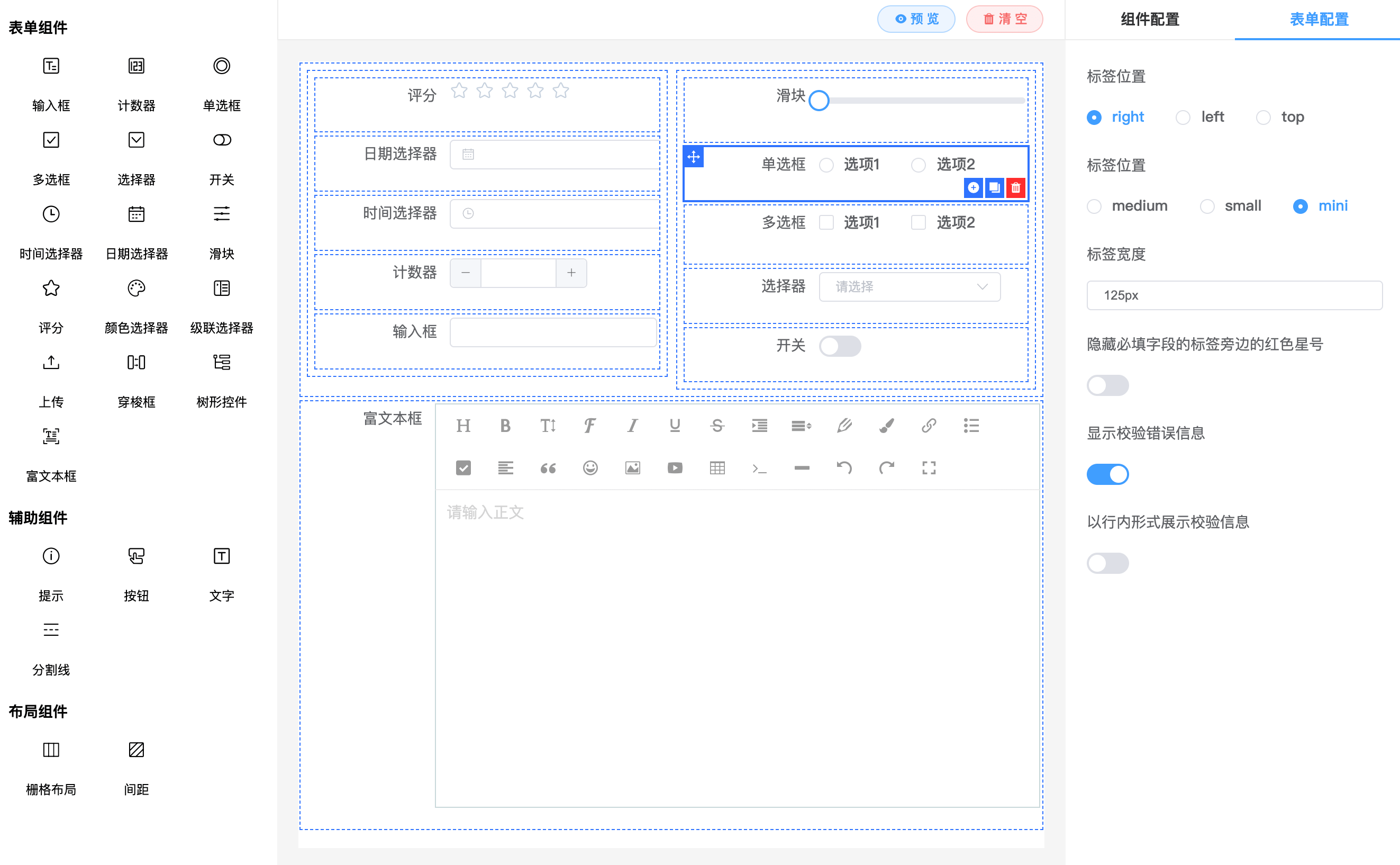
**form-create-designer 是基于 [@form-create/element-ui](https://github.com/xaboy/form-create) vue3版本实现的表单设计器组件。可以通过拖拽的方式快速创建表单,提高开发者对表单的开发效率,节省开发者的时间。**
|
|
|
|
**[文档](http://designer.form-create.com/guide/) | [在线演示](http://form-create.com/v3/designer?fr=github) | [form-create 文档](http://form-create.com/v3/guide/)**
|
|
|
|
> 如果对您有帮助,您可以点右上角 "Star" 支持一下 谢谢!本项目还在不断开发完善中,如有任何建议或问题[请在这里提出](https://github.com/xaboy/form-create-designer/issues/new)
|
|
|
|
> 本项目QQ讨论群[629709230](https://jq.qq.com/?_wv=1027&k=F1FlEFIV)
|
|
|
|
|
|
|
|
|
|
|
|
## 引入
|
|
|
|
**CDN:**
|
|
|
|
```html
|
|
<link href="https://unpkg.com/element-plus@2.0.1/dist/index.css"></link>
|
|
<script src="https://unpkg.com/vue@next"></script>
|
|
<script src="https://unpkg.com/element-plus@2.0.1/dist/index.full.js"></script>
|
|
<script src="https://unpkg.com/@form-create/element-ui@next/dist/form-create.min.js"></script>
|
|
<script src="https://unpkg.com/@form-create/designer@next/dist/index.umd.js"></script>
|
|
```
|
|
|
|
**NodeJs:**
|
|
|
|
```shell
|
|
npm install @form-create/designer@next
|
|
```
|
|
|
|
请自行导入`ElementPlus`并挂载
|
|
|
|
```js
|
|
import formCreate from '@form-create/element-ui'
|
|
import FcDesigner from '@form-create/designer'
|
|
|
|
app.use(formCreate)
|
|
app.use(FcDesigner)
|
|
```
|
|
|
|
## 使用
|
|
|
|
```html
|
|
<fc-designer ref="designer"/>
|
|
```
|
|
|
|
## 组件`props`
|
|
|
|
- **menu**`MenuList` 重新配置拖拽的组件
|
|
|
|
- **height**`int|string` 设计器组件高度, 默认`100%`
|
|
|
|
## 组件方法
|
|
|
|
- 获取当前生成表单的生成规则
|
|
|
|
```ts
|
|
type getRule = () => Rule[]
|
|
```
|
|
**示例: `this.$refs.designer.getRule()`**
|
|
|
|
- 获取当前表单的全局配置
|
|
|
|
```ts
|
|
type getOption = () => Object
|
|
```
|
|
|
|
- 设置当前生成表单的规则
|
|
|
|
```ts
|
|
type setRule = (rules: Rule[]) => void;
|
|
```
|
|
|
|
- 设置当前表单的全局配置
|
|
|
|
```ts
|
|
type setOption = (option: Object) => void;
|
|
```
|
|
|
|
- 增加一组拖拽组件
|
|
|
|
```ts
|
|
type addMenu = (menu: Menu) => void;
|
|
```
|
|
- 删除一组拖拽组件
|
|
|
|
```ts
|
|
type removeMenu = (name: string) => void;
|
|
```
|
|
|
|
- 批量覆盖插入拖拽组件
|
|
|
|
```ts
|
|
type setMenuItem = (name: string, items: MenuItem[]) => void;
|
|
```
|
|
|
|
- 插入一个拖拽组件到分组
|
|
|
|
```ts
|
|
type appendMenuItem = (name:string, item: MenuItem) => void;
|
|
```
|
|
|
|
- 删除一个拖拽组件
|
|
|
|
```ts
|
|
type removeMenuItem = (item: string | MenuItem) => void;
|
|
```
|
|
|
|
- 新增一个拖拽组件的生成规则
|
|
|
|
```ts
|
|
type addComponent = (item: DragRule) => void;
|
|
```
|
|
> **提示! 内置的三个组件分组`name`分别为: `main`,`aide`,`layout`**
|
|
|
|
## 捐赠
|
|
|
|

|
|
|
|
## 联系
|
|
|
|
##### email : xaboy2005@qq.com
|
|
|
|
## License
|
|
|
|
[MIT](http://opensource.org/licenses/MIT)
|
|
|
|
Copyright (c) 2021-present xaboy
|